Documentation
Everything you need to know about RPCleaner.

How it works
See the full setup flow, step by step.
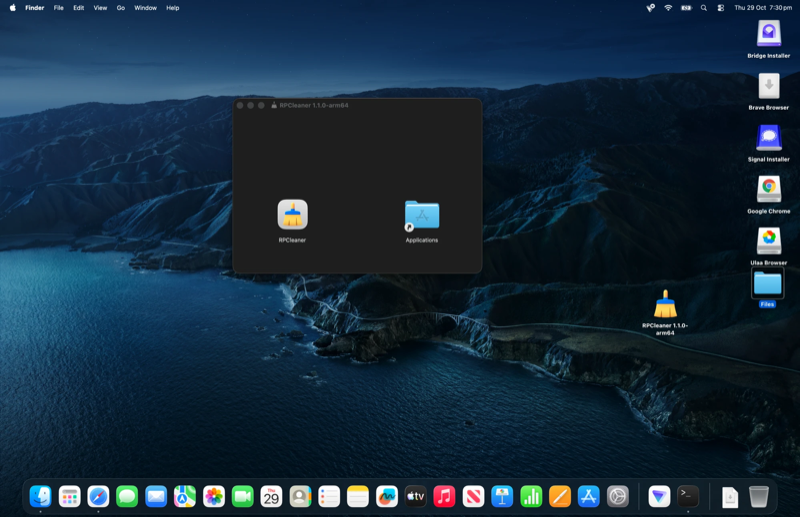
Open the .dmg file
Double-click the downloaded file to mount it. Drag RPCleaner into the Applications folder, then launch it.
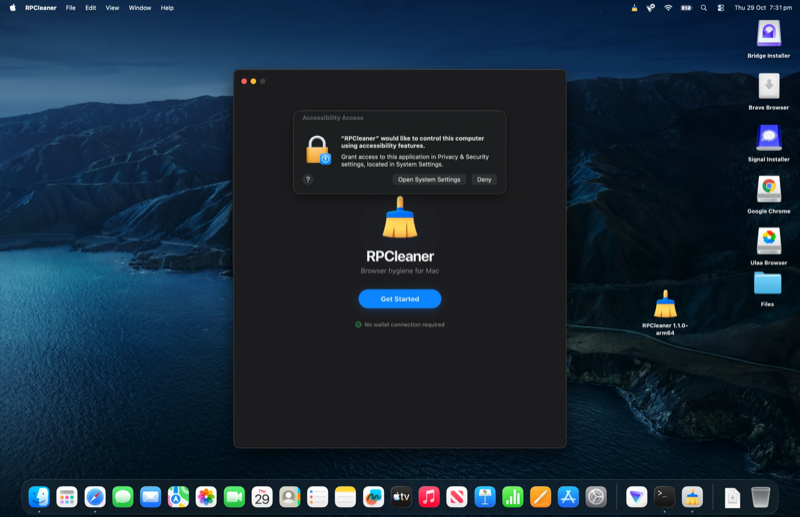
Click "Open System Settings"
RPCleaner needs Accessibility permission to protect your wallets. Click Open System Settings to continue.
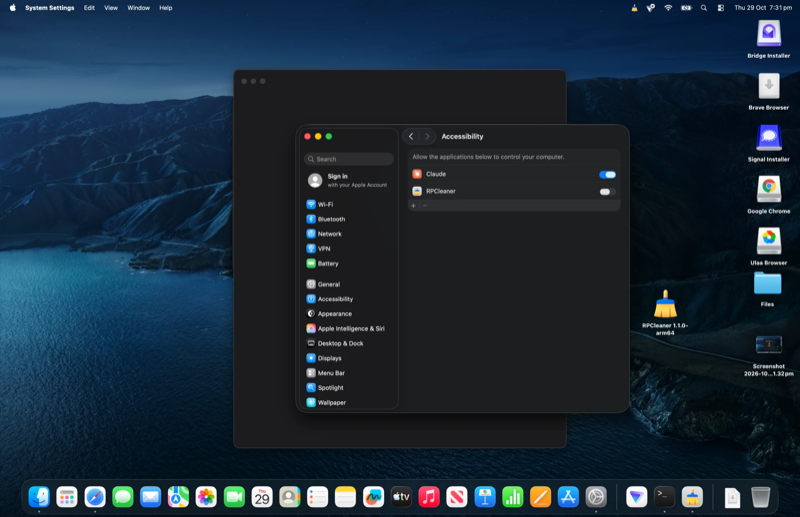
Toggle RPCleaner on
Find RPCleaner in the list and flip the toggle. You may need to enter your password or use Touch ID to confirm.
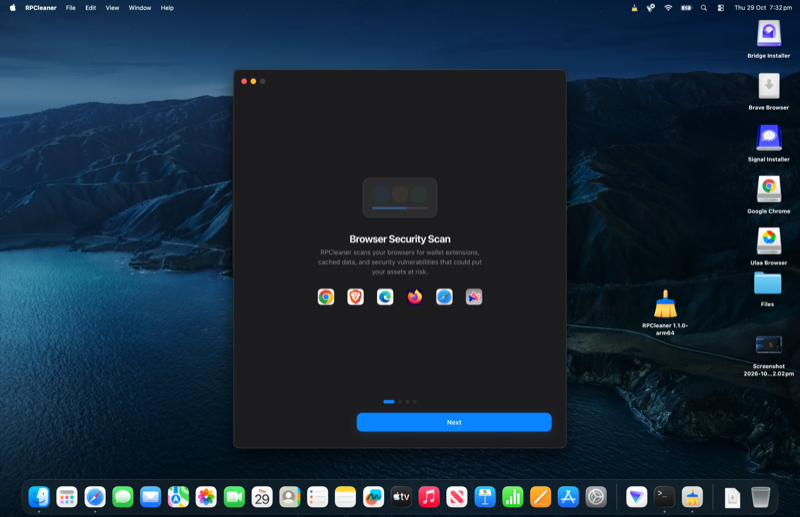
You're protected
RPCleaner is now active. It will scan your browsers for wallet extensions and guard your RPC connections in real time.
Get started with RPCleaner
Free during early access. Install in under a minute, no account needed.


 All Chromium browsers
Requires macOS 12+ or Windows 10+. The agent runs locally and connects automatically after install. No browser extensions, no wallet connections, no accounts.
RPCleaner is built on a simple principle: we never need access to your wallets, and we never ask for it. No wallet connections. No sign-ups. The agent runs a one-time session on your browser to clear out old cookies, cached sessions, and leftover extension data. Think of it like clearing your browser history, but smarter and focused on what actually matters for your safety.
RPCleaner never asks you to connect MetaMask, Phantom, Rabby, or any other wallet. It does not interact with your funds or request approvals. It checks your browser environment from the outside, the same way an antivirus scans files without opening your bank account.
What RPCleaner does
RPCleaner checks your installed browsers for outdated extensions, cached session data, stale cookies, and risky RPC endpoints. It identifies what needs attention and cleans it up. That is all it does.
It does not:
❌ Ask to connect any wallet
❌ Require any account or sign-up
❌ Send your browser data anywhere
❌ Collect usage information or browsing habits
❌ Store anything about you on our end
100% local cleaningEverything runs on your machine. Your browser data stays on your computer. There are no cloud uploads and no analytics. When RPCleaner clears a cached session or flags a risky endpoint, it happens right in your browser.
📥 What happens when you first install
Like any desktop app, RPCleaner needs a couple of permissions to get started. Here is what you will see and why.
⚠️ "macOS cannot verify the developer"
Apple shows this for apps downloaded outside the Mac App Store. RPCleaner is signed and notarized by Alchemy, but because we distribute it directly (so you get updates faster), macOS flags it the first time you open it.
What to do: Right-click the app and choose "Open." After that, it opens normally every time.
🔑 "RPCleaner would like accessibility access"
RPCleaner uses accessibility permissions to check your browsers (Chrome, Firefox, Brave, Arc) for outdated extensions and leftover session data. This is how it knows what needs cleaning. It only looks at your browser environment and never touches your bookmarks, saved passwords, or browsing history.
📂 "RPCleaner would like to access your Documents"
macOS may ask this when RPCleaner checks browser profiles stored in your user folder. It only reads browser data to find what needs cleaning. It does not open, read, or modify any of your personal files or documents.
🛡️ "Windows protected your PC" (SmartScreen)
Windows SmartScreen shows this for newer applications that have not yet built up a large install base. RPCleaner is code-signed with a verified certificate from Alchemy, Inc., and SmartScreen learns to trust it as more users install it.
What to do: Click "More info" and then "Run anyway."
🔔 "Allow RPCleaner to make changes to your device"
Windows User Account Control (UAC) shows this during installation. RPCleaner needs standard install permissions to set itself up in your Programs folder. It does not modify system files or change any Windows settings.
🌐 "Allow RPCleaner through Windows Firewall"
Windows may ask if RPCleaner can access the network. It only uses this to check for application updates from Alchemy's servers. No browser data, no personal info, and no usage stats are ever sent.
Why Alchemy
RPCleaner is built by Alchemy, the infrastructure company behind some of the largest platforms in Web3.
💰 $10B+ valuation
Backed by Andreessen Horowitz, Lightspeed, and Silver Lake.
⭐ Trusted by the industry
The same infrastructure behind OpenSea, Adobe, and Shopify's Web3 integrations.
⏱️ Years of uptime
99.9% uptime at scale. Reliability is the track record.
✅ Security-first culture
Security is a first principle, not an afterthought. RPCleaner is built with that same discipline.
RPCleaner will never ask to connect your wallet. It will never send your data anywhere. If any of this ever changes, we will tell you before you update, and you can choose not to.